
Following one CNFans find from a seller in China to your hallway
Historical CNFans tutorial: nine steps and original screens, verified on 23 September 2026. The official site still displayed a maintenance notice on 21 October. Check account availability and current terms before purchasing; old prices, promotions and allowances visible in the images are not today’s offer.
Nine hand-offs from the seller link to your doorway. Keep purchase, domestic delivery, warehouse checks and the international parcel separate: each has its own record, cost and next decision.
Follow the three phases in order
Steps 1–3 prepare and pay for the purchase. Steps 4–6 cover buying, domestic delivery and warehouse checks. Steps 7–9 arrange and follow the international parcel.
- Search the product link
- Select specifications and submit
- Pay for the goods and domestic delivery
- The agent accepts the order and purchases
- The seller sends the goods to the warehouse
- Inspect the arrival photos and Warehouse record
- Select warehouse items and request outbound shipping
- Choose the route and pay international shipping
- Follow dispatch in Parcels and check delivery
Watch the official CNFans tutorial · 1 min 37 sec
The video shows the historical interface. The written steps below cover the same journey; check available methods and charges in your account.
Your purchase request
Step 1. Search the product link
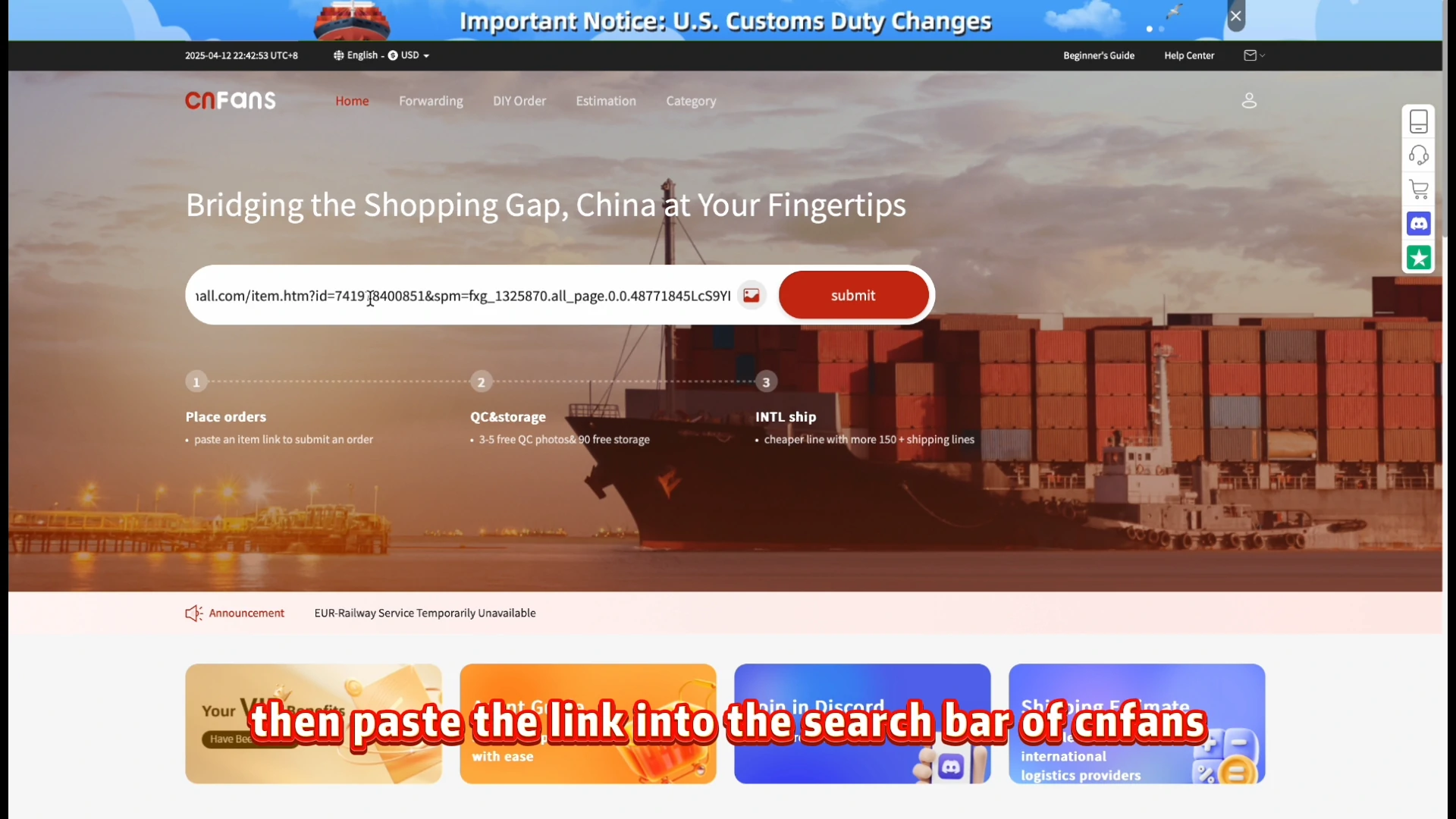
Open the original seller listing, copy its product URL and search that link on CNFans. The historical official tutorial begins with this input; a spreadsheet card or category URL is only a discovery aid. Check that the imported product is the one you intended.
The historical instructions name Taobao and 1688. A listing found on another marketplace is not proof that CNFans currently accepts it. Confirm platform and product eligibility before paying.
Start with the search box on the home page or a rack such as hoodies or jeans. A catalogue card shows a photo, a title and a price range in yuan. The range exists because most listings are menus: colours, sizes and sometimes different products under one link.
Open the listing itself before you decide. That is where you choose the option you want, see every photo the seller posted, and read the description, which on Chinese marketplaces often carries measurements in centimetres and fabric details that never make it onto the card.
Write down three things: the link, the exact option name as the seller spells it, and the price of that option. You will need all three when you place the order.
Your purchase request
Step 2. Select specifications and submit
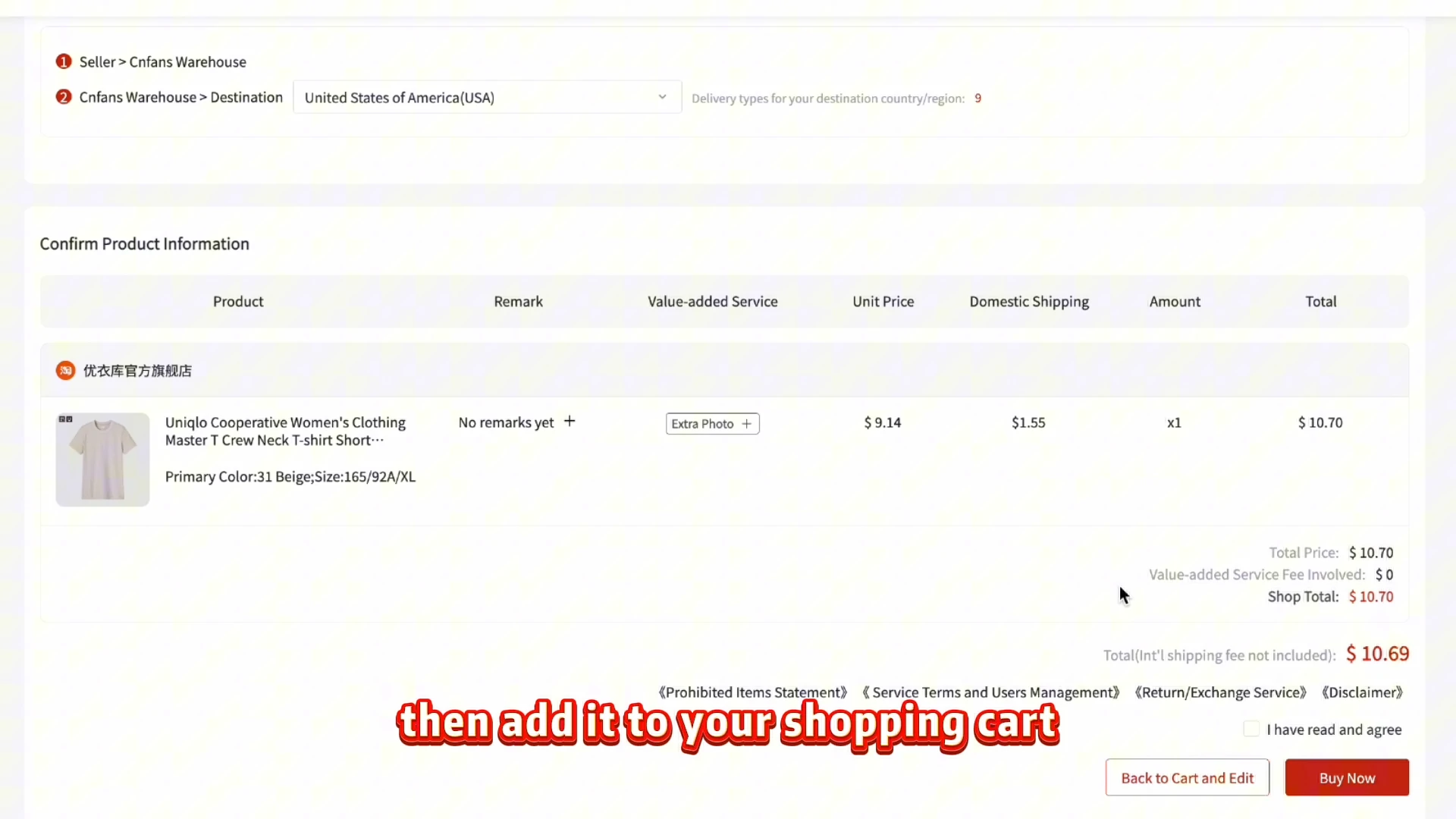
Choose the exact colour, size, version and quantity, then add the item to the cart or submit it for purchase. Compare the order summary with the seller menu, including the chosen option price, domestic delivery and any requested extra service.
The video frame shows the review stage after selection, not a demonstration of every option menu. Save the option text and a reference image; a cover containing several products does not order all of them.
Use the note for facts a warehouse can act on: “size L, the navy one, not the black”. Long requests written in a second language get misread. If the option names are in Chinese, copy them exactly instead of translating.
Your purchase request
Step 3. Pay for the goods and domestic delivery
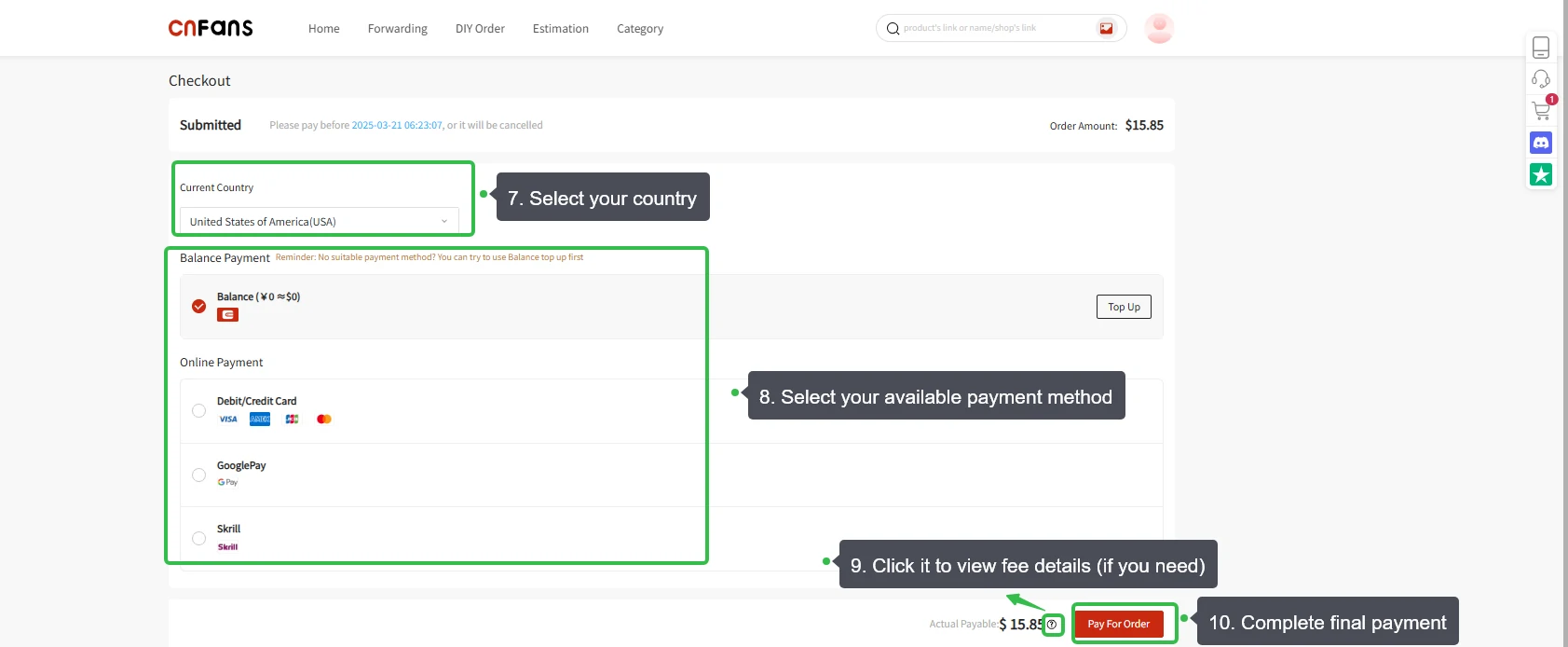
The first payment funds the selected goods and the seller’s delivery to the Chinese warehouse, together with charges disclosed for that order. It excludes international shipping. Check destination, payment method, currency, conversion and fee details before confirming.
Keep the order number and payment record. Submitted or Payment Pending is not proof of a completed payment; check the resulting order status before paying again. Historical payment logos and amounts are examples, not current availability or a quotation.
Purchase and warehouse
Step 4. The agent accepts the order and purchases
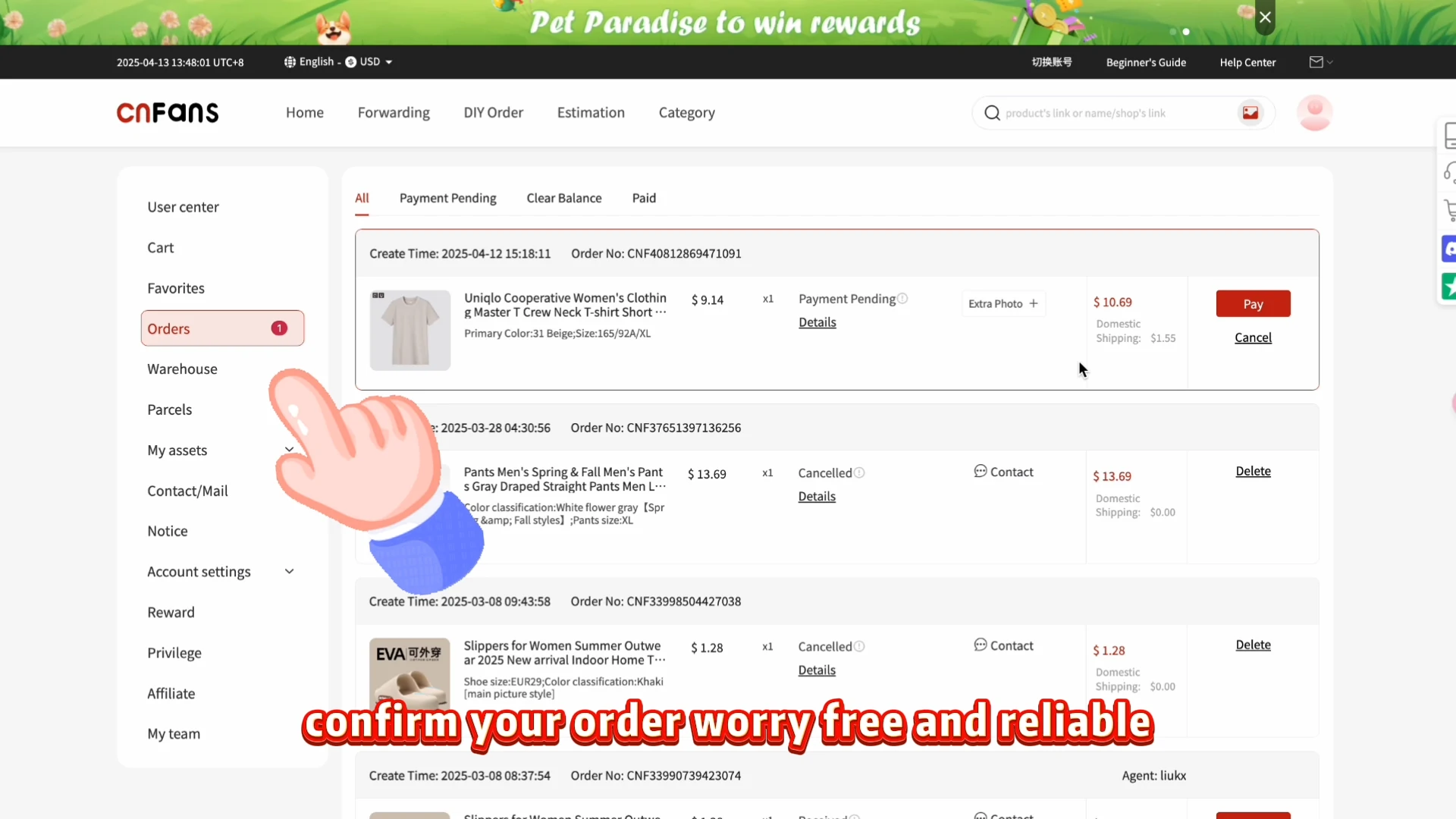
After payment, CNFans accepts the request and purchases from the seller. Check the order’s progress in Orders and read any message about stock, option changes or additional charges. A paid request and a completed seller purchase are different stages.
If the selected option is unavailable, ask for the proposed replacement or cancellation terms before agreeing. Keep the exact replacement specification, refund amount, any retained fee and the refund destination in the order record.
Purchase and warehouse
Step 5. The seller sends the goods to the warehouse
After purchase, the seller dispatches the item to a CNFans warehouse in China. This is domestic transport, not the international parcel to your address. A purchase confirmation does not prove dispatch, and a courier delivery scan does not prove the item has finished warehouse processing.
Check the seller’s dispatch estimate and the order update. If progress stops, use the item and order numbers to ask which hand-off is outstanding. Avoid setting a guaranteed arrival date from a different buyer’s order.
The warehouse arrival record is not available until the item has been received and processed. If the seller cannot supply the option, ask the agent to confirm the available choices and any cancellation conditions. A refund request needs an agreed amount and destination; do not assume it becomes balance credit.
Purchase and warehouse
Step 6. Inspect the arrival photos and Warehouse record
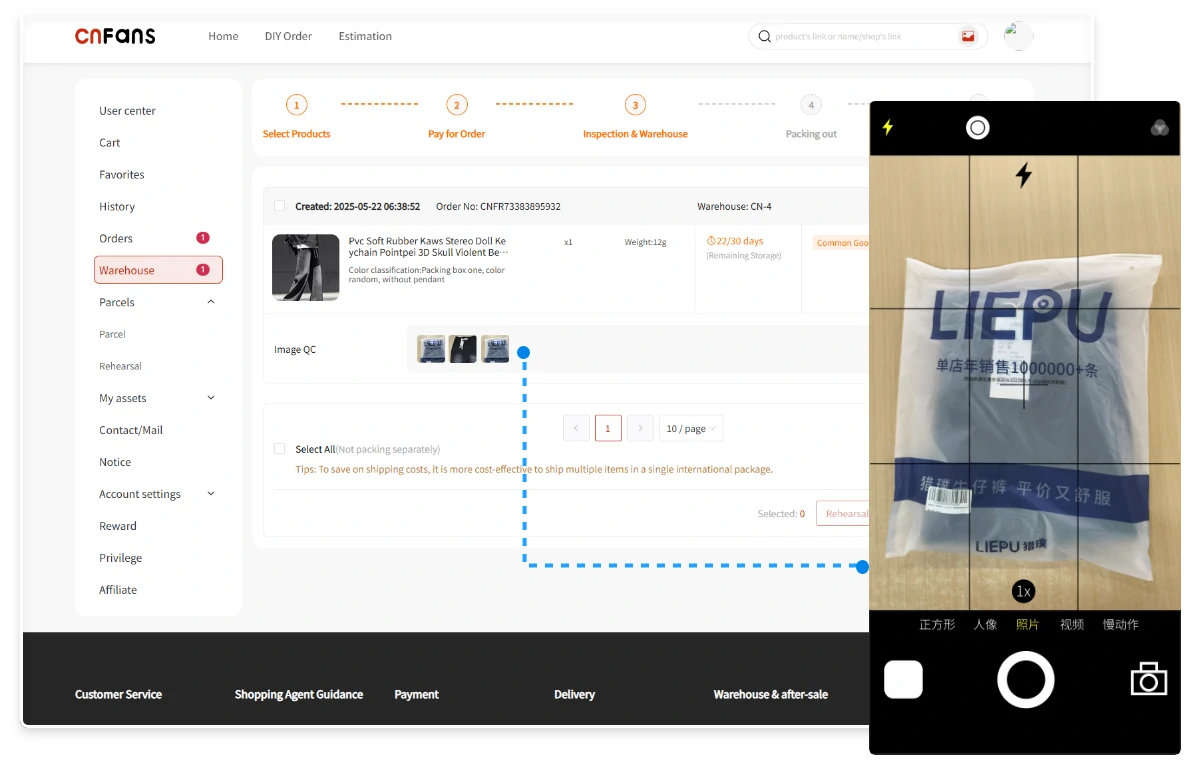
The official sequence next places inspection and warehousing after receipt. Open Warehouse and the available QC photos, then compare the actual item with the saved option, quantity, size label and requested details. Check the item record and any storage deadline.
Request a specific missing view or measurement if needed, confirming its availability and charge first. Resolve discrepancies before international dispatch where possible. QC photographs do not prove authenticity, hidden performance or a right to a free return.
Read the warehouse photo checklist before arranging shipment. Report a wrong colour or missing part with the saved listing and order record. A domestic return can be simpler than an overseas one, but seller acceptance, deadlines and charges still need checking.
The international parcel
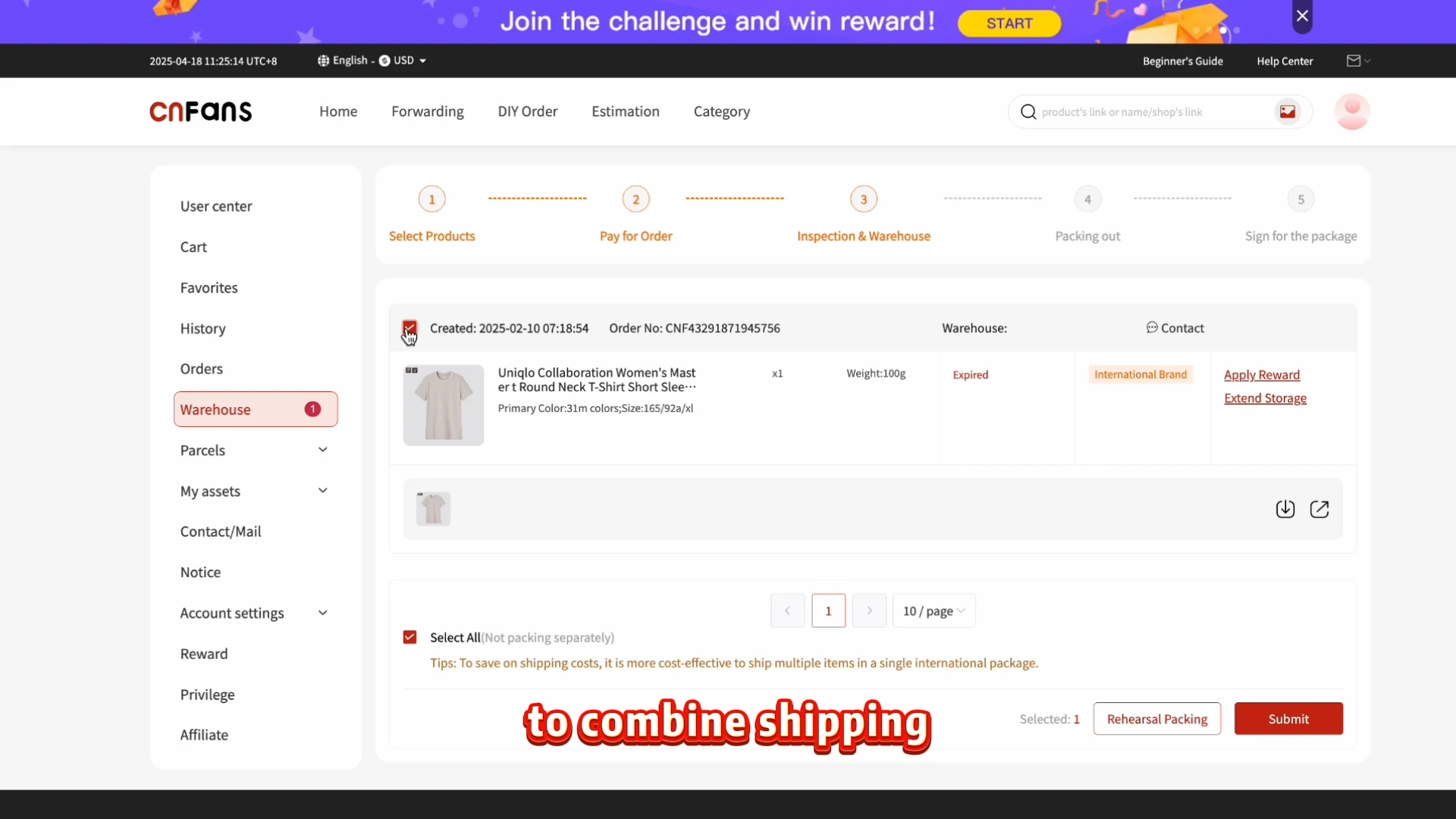
Step 7. Select warehouse items and request outbound shipping
In Warehouse, select the eligible items you want sent together and submit the outbound shipping request. Check the recipient, contents, packing choices and the shipping method offered. In the archived guide this request comes before choosing the route and paying international freight.
Resolve expired storage, incomplete checks or other eligibility warnings first. A ticked item is not automatically ready to ship. Compare combining and separating items; extra bulk or restricted contents can change which routes are available.
Combining items can avoid repeated minimum shipping charges, but it can also increase dimensional weight or exclude a suitable line. Compare combined and separate quotes for the actual contents. The archived CNFans homepage described combining warehouse items; it did not guarantee that consolidation is always cheapest.
Combining has limits. Lines set maximum weights and sizes, some goods cannot travel with others, and a single oversized item can push the whole parcel into a higher charge. Run the box planner with the recorded weights before you press the button, and decide here whether shoeboxes and hangers travel.
The international parcel
Step 8. Choose the route and pay international shipping
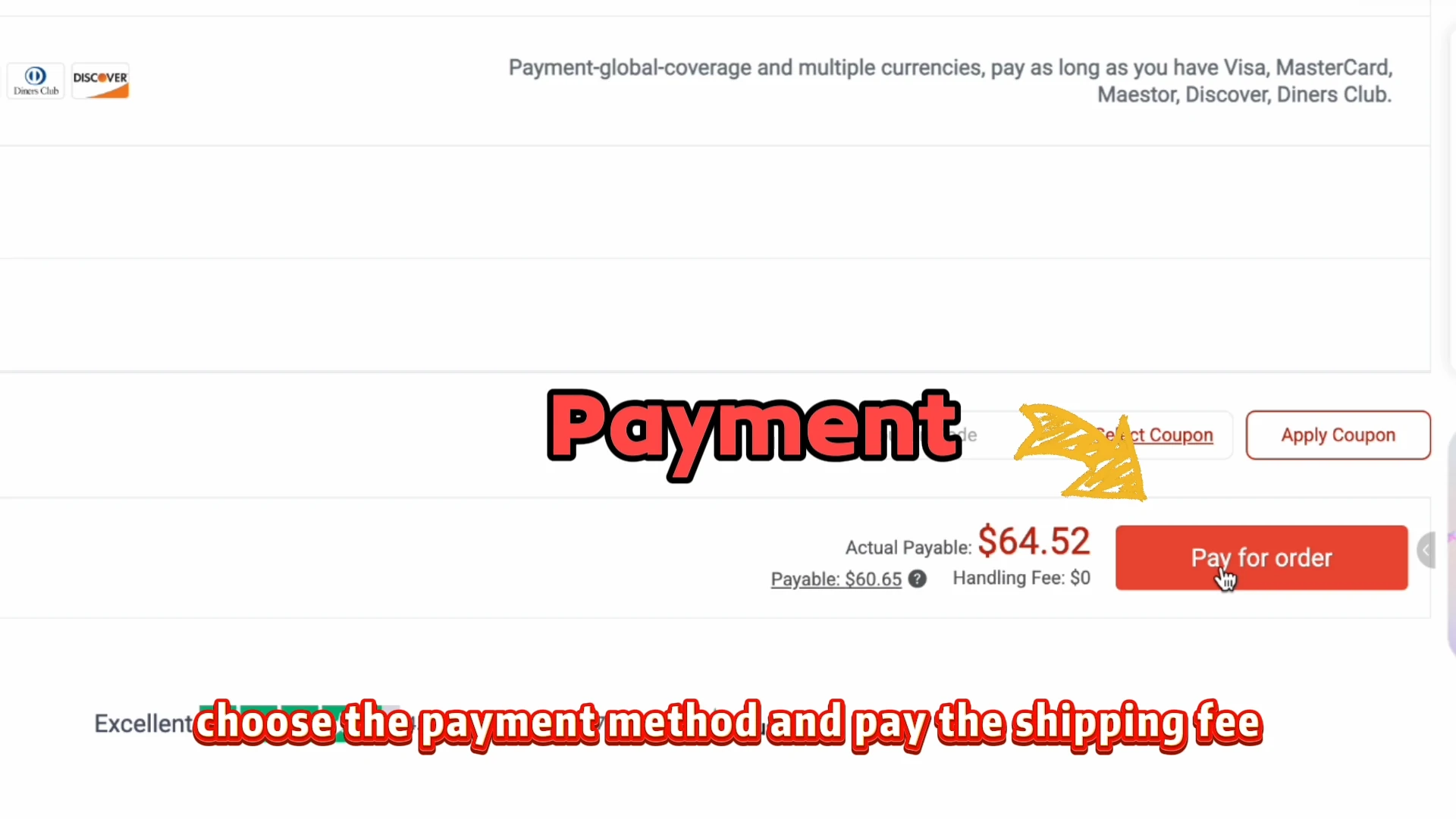
After the outbound request, choose an available logistics route and pay its shipping charge. Check destination coverage, permitted contents, charging weight, dimensions, packing services and any disclosed additional charges. Save the selected quote and payment record.
Follow the account’s stated weighing, packing and settlement procedure: a prepaid estimate may require a later adjustment, while other options use a confirmed quote. Do not treat the goods payment, a cost calculator or the historical amount in the video as the final international bill.
The shipping lines page explains how to choose between speed, price and tracking, and why the cheapest line on the day can be the wrong one for perfume, batteries or a tight deadline.
The international parcel
Step 9. Follow dispatch in Parcels and check delivery
After dispatch, open Parcels for the shipment record and tracking. Keep the parcel number and carrier tracking number with the order list. An outbound request or a paid shipping bill is not, by itself, evidence that the carrier has collected the box.
Follow the carrier’s scans and any delivery or import-charge notice through its official channels. On arrival, photograph the parcel and compare contents with the order and warehouse records. Report a discrepancy promptly under the applicable claim terms, keeping packaging and evidence.
Missed deliveries go to a depot or collection point, often with a short holding period. Keep the tracking page open in the last week, answer carrier messages quickly, and only pay charges through links you reached from the carrier’s own website.
Working across time zones with sellers and the warehouse
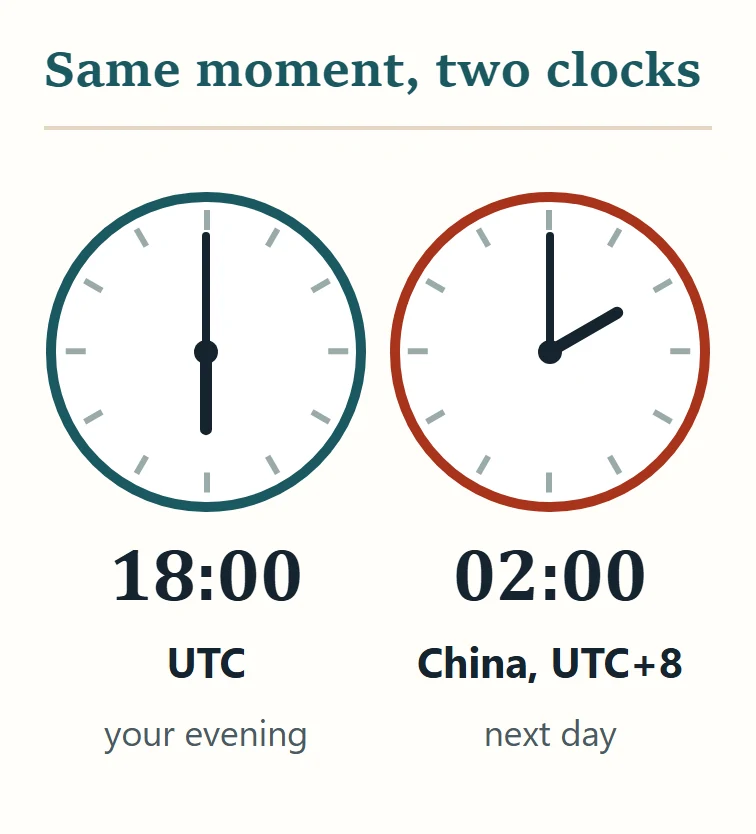
Sellers and warehouses in mainland China keep China Standard Time, eight hours ahead of UTC, and the country does not move its clocks in summer. A question sent at dinner time in London lands in the small hours in China; one sent from the American west coast in the afternoon arrives the next morning.
Time in China (UTC+8): --:--
Time where you are: --:--
The archived CNFans pages showed a clock in the page header with a time zone label. The copy captured on 23 August 2026 read UTC-7 while a July copy read UTC+8, which suggests the clock followed the visitor rather than the warehouse. Do not read it as the warehouse’s working day.
Leg five: waiting in storage
Keep an arrival date for each stored item and check the current account’s storage deadline, any free allowance, extension fee and disposal rules. Waiting for another item can change those costs. Set a shipping date with enough time to resolve a photo question first.
Find the current figure on your own account before you start a long wait for one late item. A cheap parcel that sat a month too long is not cheap.
What to decide before the parcel-planning stage
The historic CNFans home page placed its link-entry field before the warehouse and international-shipping steps. Use that order when planning: first establish exactly what is being purchased, then use actual arrival information to build the parcel.
For a coat, save the selected size and colour, the seller’s dimensions and whether the listing includes a storage bag or other accessory. Before payment, check that at least one suitable route accepts the contents. A future estimate is only useful if the product is eligible for that route.
After arrival, ask for recorded weight and the available packing choices. A folded coat image does not prove its packed dimensions. When combining it with shoes, compare keeping versus removing the shoebox using the actual options offered. Do not assume a service, fee or storage period from another agent applies to CNFans.